Build an Interactive Wall
Project games onto the wall. All you need is a projector, a camera and our free software.

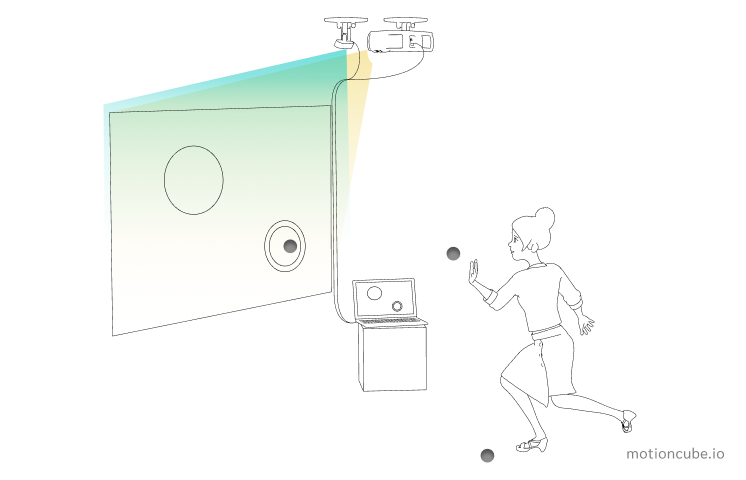
How it works
The projector shows the game
It faces the wall and lights up a rectangle on it. That rectangle is your play area.
The camera watches the balls
It tracks every ball that hits the surface, and can follow several of them at once.
The game reacts on impact
Hit a target and it bursts. Every throw changes what everyone sees on the wall.
Three things and you’re set
No custom hardware, no installers on site. You can put this together yourself.
Motioncube Player
Our software. Free to download and it installs in a few minutes.
Download PlayerA projector
Most projectors will do the job. We’ll help you pick one that fits your room.
How to chooseA depth camera
Orbbec Astra 2 is our go-to, but several other models work just as well.
Supported camerasAlready have a projector? Then you’re most of the way there.
Watch how it comes together
A short animation of the whole setup, from projector to first game.

Why this is easier than it looks
The software is free
Install it on your computer today and start playing right away.
Hardware you can just buy
Order the parts online, or use equipment your place already owns.
Plenty to play
Pick from a ready library of ball games and effects, or make your own.
You’re not on your own
Step-by-step guides, and a real person answering at [email protected].
Start with these, for free
Three apps to test your setup the day you switch it on.


Need a hand?
Follow our step-by-step guide for your first interactive wall. If anything goes wrong, write to us — we answer every question.
Your first interactive wallPlanning something bigger?
For advanced users and integrators we prepared ready-made configurations — hardware specifications, setup videos and licensing for professional installations.
Configurations for integratorsReady to try it?
Download Motioncube PlayerManage Consents
Control which external services can process your data.
Essential Required
These features are essential for the proper functioning of the website and cannot be disabled.
Anonymous Analytics Required
Required for collecting aggregated statistics that help us understand how users interact with our site. Data is fully anonymous, contains no personal information, and we do not use cookies.
Extended Analytics
Allows analyzing traffic sources (where you came from), marketing campaign parameters (UTM), and navigation paths across subdomains. We use a cookie (7 days) to preserve this data.
External Media
Allows loading content from external services like YouTube or Vimeo.
