
Mobile Augmented User Interface
Distributed UI for interactive installations
Use network communication to connect mobile devices to an interactive installation. This enables distributed interfaces where participants can control, collaborate or compete while the main content runs on the projected surface.
Mobile augmented UI
How it's working?

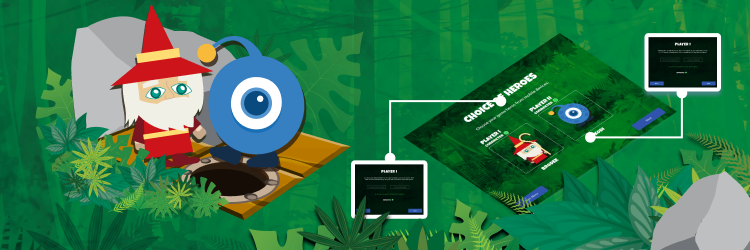
An example scenario for the application Kodi Challenge Team.
The host launches with an IR pen the application on the interactive floor and selects a game level that the users (or teams) will solve. The user's goal is to lead the hero to the finish line by arranging a code of picture blocks on a mobile device. Ready codes are sent to the main app on which the game will start. The host may download the codes from the players, even if they have not yet been sent to the main app.
In co-op, teams communicate with each other to create codes that will allow their heroes to work together and beat the board together.
In competitive mode, teams work alone. The team whose hero reaches the finish line first or completes a mission wins. Players can set traps for the opposing team's heroes.

Why integrators use mobile augmented UI

Support multiple participants at once: users on tablets can collaborate or compete while a host runs the main app on the surface.

Mobile screens can provide comfortable, close-up controls while the shared projection stays visible for everyone.

Collect user input from devices and submit it to the host when ready. Time constraints can add structure for classrooms or events.

Users interact with a shared virtual board and can work toward a common goal or compete in teams.

Staged submissions can keep competitive outcomes uncertain until the moment of execution on the main surface.
Apps with mobile augmented user interface
Mobile augmented UI lets you combine a shared projection with personal controls. Participants can create inputs on tablets (for example, instructions for characters) and send them to the main app.
This format works well for classrooms and events because it supports teamwork, communication and healthy competition while keeping the shared experience visible on the surface.


Explore other interaction options

Motion
Add full-body motion interaction
IR Pens
Add precise IR pen tracking
RC Vehicles
Track RC vehicles for robotics play
Try our apps today!
Try it now!Manage Consents
Control which external services can process your data.
Essential Required
These features are essential for the proper functioning of the website and cannot be disabled.
Anonymous Analytics Required
Required for collecting aggregated statistics that help us understand how users interact with our site. Data is fully anonymous, contains no personal information, and we do not use cookies.
Extended Analytics
Allows analyzing traffic sources (where you came from), marketing campaign parameters (UTM), and navigation paths across subdomains. We use a cookie (7 days) to preserve this data.
External Media
Allows loading content from external services like YouTube or Vimeo.
